![VEXCEL_Data_Program_Brand_outline_Logo_Horizontal_Black.jpg]](https://support1.vexceldata.com/hs-fs/hubfs/Logos/VEXCEL_Data_Program_Brand_outline_Logo_Horizontal_Black.jpg?height=40&name=VEXCEL_Data_Program_Brand_outline_Logo_Horizontal_Black.jpg)
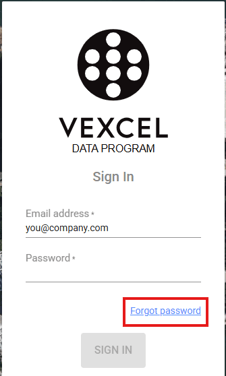
1. Forgot Password on login screen:
The user can reset their password at the sign-in screen by selecting "Forgot password".
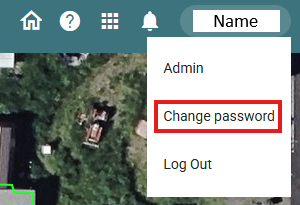
2. Reset from within the Vexcel Viewer:
When you are signed in to your Viewer account, click on your name in the upper-right corner of the window and select "Change password" from the dropdown. If you have any trouble resetting your password, please email support@vexcelgroup.com , and we will be happy to assist you.
If your organization is using Federated Authentication (SSO), you will not have either of these options. If you are having trouble accessing the Vexcel Viewer, please email support@vexcelgroup.com